Showing posts with label Today's Gadget. Show all posts

Sunday, December 30, 2012

Cracking Your PIN Code: Easy as 1-2-3-4

 Today's Business Tips


Cracking Your PIN Code: Easy as 1-2-3-4


Yahoo! editors have selected this article as a favorite of 2012. It first appeared on Yahoo! Finance in September and was one of the most popular stories of the month. Readers joked about people who use the most common PIN codes, and shared how they came up with their own. "My pin number is my post office box number from my time in the Air Force 30 years ago on a base that no longer exists," wrote user Nick. "Feel free to hack that."


If you lost your ATM card on the street, how easy would it be for someone to correctly guess your PIN and proceed to clean out your savings account? Quite easy, according to data scientist Nick Berry, founder of Data Genetics, a Seattle technology consultancy.


Berry analyzed passwords from previously released and exposed tables and security breaches, filtering the results to just those that were exactly four digits long [0-9]. There are 10,000 possible combinations that the digits 0-9 can be arranged into to form a four-digit code. Berry analyzed those to find which are the least and most predictable. 

He speculates that, if users select a four-digit password for an online account or other web site, it's not a stretch to use the same number for their four-digit bank PIN codes.


What he found, he says, was a "staggering lack of imagination" when it comes to selecting passwords. Nearly 11% of the 3.4 million four-digit passwords he analyzed were 1234. The second most popular PIN in is 1111 (6% of passwords), followed by 0000 (2%). (Last year SplashData compiled a list of the most common numerical and word-based passwords and found that "password" and "123456" topped the list.)
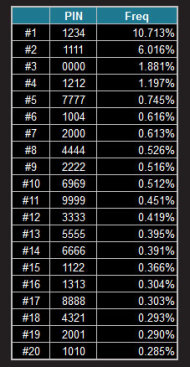


Berry says a whopping 26.83% of all passwords could be guessed by attempting just 20 combinations of four-digit numbers (see first table). "It's amazing how predictable people are," he says.
We don't like hard-to-remember numbers and "no one thinks their wallet will get stolen," Berry says.


Days, Months, Years


Many of the commonly used passwords are, of course, dates: birthdays, anniversaries, year of birth, etc. Indeed, using a year, starting with 19__, helps people remember their code, but it also increases its predictability, Berry says. His analysis shows that every single 19__ combination be found in the top 20% of the dataset.
"People use years, date of birth — it's a monumentally stupid thing to do because, if you lose your wallet, your driver's license is in there. If someone finds it, they've got the date of birth on there. At least use a parent's date of birth [as a password]," says Berry.


Somewhat intriguing was #22 on the most common password list: 2580. It seems random, but if you look at a telephone keypad (or ATM keypad), you'll see those numbers are straight down the middle — yet another sign that we're uncreative and lazy password makers.


The Least Predictable Password


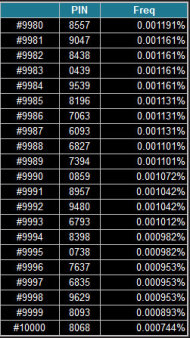
The least-used PIN is 8068, Berry found, with just 25 occurrences in the 3.4 million set, which equates to 0.000744%. (See the second table for the least popular passwords.) Why this set of numbers? Berry guesses, "It's not a repeating pattern, it's not a birthday, it's not the year Columbus discovered America, it's not 1776." At a certain point, these numbers at the bottom of the list are all kind of "the lowest of the low, they're all noise," he says.


A few other interesting tidbits from Berry:

-The most popular PIN code (1234) is used more than the lowest 4,200 codes combined.

- People have even less imagination in choosing five-digit passwords — 28% use 12345.
 
- The fourth most popular seven-digit password is 8675309, inspired by the Tommy Tutone song.
 
-People love using couplets for their PINs: 4545, 1313, etc. And for some reason, they don't like using pairs of numbers that have larger numerical gaps between them. Combinations like 45 and 67 occur much more frequently than 29 and 37.
 
-The 17th most common 10-digit password is 3141592654 (for those of you who are not math nerds, those are the first digits of Pi).

Tuesday, November 13, 2012

Monday, October 24, 2011

Popular smartphones no longer worth buying


Today's Gadgets                                                                                                           


Popular smartphones no longer worth buying

  Advisor-bar
 by Marty Gabel 


There is no better time than now to purchase a smartphone. Apple’s iPhone 4S and the soon-to-be released Samsung Galaxy Nexus and Motorola RAZR are setting new standards in smartphone functionality, reliability and design.

In fact, these top-of-the-line devices are setting a higher bar for everyone else in the cellular industry. Top-selling smartphones and one-time household names are increasingly becoming obsolete. And while less advanced and older-model phones will no doubt be discounted to compete, you will still end up paying in the long run. You will likely spend several hundred dollars to use your phone over the course of a two-year contract. So you’re better off ponying up more at the time of purchase to get the best possible device.

With that in mind, you should think twice before purchasing these popular smartphones.


Motorola Droid X2


This is not a terrible phone by any means, and when released last May was viewed as one of the best phones to run on Google’s Android operating system. But with the new and improved RAZR on the horizon, and already-released Motorola devices like the Droid Bionic, Droid 3, and Atrix 2 available, the Droid X2 is starting to look a little long in the tooth. To its credit, the Droid X2 does rock a dual-core processor, which makes surfing the web super-fast. Yet this capability is becoming standard among top-of-the-line smartphones including the iPhone 4S, Samsung Galaxy Nexus (dubbed the Nexus Prime), and the Motorola RAZR. 

Further, the Droid X2 doesn’t offer 4G/LTE capabilities, and was plagued with issues when Android released a software update earlier this year.


BlackBerry Curve 9350/9360/9370


While BlackBerry Curve model smartphones are — like the ads say — slim and stylish, they aren’t exactly “easy to use.” Being slim is actually a detriment to these newer Curve models, which were released earlier this month after an initial delay. Both the BlackBerry Bold and BlackBerry Torch models offer far more screen real-estate to make your smartphone experience a little bit smoother. The Curve is also plagued by poor battery life, which for many BlackBerry addicts is a deal-breaker. BlackBerry creator Research in Motion, which also a few short years ago was the most respected smartphone manufacturer in the world, is having even bigger issues. The company recently suffered a huge outage that cut service for approximately 70 million users around the world. 

While this may have been a one-off incident, worries about the network’s durability are likely to prevail for some time.


HTC EVO 4G


As the first 4G smartphone on the nation’s first 4G network, Sprint subscribers with a need for speed couldn’t pick up an HTC EVO fast enough when it became available last year. This is still a respectable device and offers good value for the money with its big 4.3-inch screen and WiMax capabilities. 

However, for Sprint subscribers who want an Android phone, there are newer and better options today. The EVO 3D boasts similar specs, but offers more than just a 3D camera. 

Upgrades for the EVO 3D include a dual-core processor, better screen resolution and a bigger battery. The phone is also less bulky. The recently announced HTC EVO Design, smaller and less powerful than the original EVO 4G, offers dual bands which is great for international travel.


Palm Pre 2


Many of us who owned handheld comptuers before smartphones have a soft spot for Palm, a pioneer in personal data assistant revolution. In recent years, Palm loyalists could still look forward to new devices put out by HP that ran on the underrated WebOS mobile operating software. Today, you can pick up a trusty Pre 2 for $149.99 with a new two-year Verizon contract. However, don’t expect to get much out of the Pre 2 aside from a nice nostalgic effect. This past summer, HP announced that it was getting out of the mobile operating software business completely and that it would longer be releasing new smartphones. Support for webOS might not be forthcoming in the future, so if you run into software problems with the Pre 2 or any Palm device, you may have a hard time fixing them.


Motorola Titanium


The Titanium was already outdated by the time it was released in June. Motorola curiously shipped the Titanium with the older Android 2.1 software (codename Eclair). This was two generations of software behind what was available for Android phones at the time. This means that many new apps and games available for other Android phones could not be downloaded to the Titanium. The Titanium’s elegant and sturdy hardware and novel ‘push to talk’ walkie-talkie capabilities do not make up for its internal deficiencies.


HTC Surround


This smartphone runs on AT&T and uses Windows Phone 7 as its operating system. The HTC Surround has been touted for its impressive audio qualities with Dolby surround sound and pop-up speakers (instead of a slide-out keyboard, little speakers emerge instead). Trouble is, it’s a little thick and heavy. While its interesting audio capabilities are nice selling points, it doesn’t excel in other areas. For starters, there are numerous complaints about the device not syncing with non-Exchange Microsoft Outlook accounts. What’s the point of having a Microsoft phone without reliable Outlook access? 

If you need a Windows Phone 7 device, there are certainly better options available like the Samsung Focus.


Samsung Galaxy S


The original Samsung Galaxy series includes the Fascinate on Verizon, the Epic on Sprint, the Captivate on AT&T and the Vibrant on T-Mobile. These Android phones were released last year and boasted vibrant displays and plenty of horsepower. Trouble is, they are completely superseded now by the bigger and better Samsung Galaxy S II and upcoming Samsung Galaxy Nexus. The already available S II ups the ante with its higher-definition screen, dual-core processor, more RAM and a better camera. It’s a device that will hold up a lot better over a two-year contract, and will likely continue to receive upcoming Android software updates, which the original Galaxy S may not. While original Galaxy smartphones can be purchased quite cheaply, and still perform competently, for a few extra bucks it is worth investing in a device with a brighter future.

Wednesday, June 8, 2011

Predictable Passwords

Are you still using predictable passwords? If so, now is the best time to change them! Otherwise, your ATM, e-mail accounts , cell phone lock , blogs , e-locks , etc  are in danger!

Act now now before it's too late


Predictable Passwords

from National Geographic
June 2011

ATMs and online banking require passwords. So do email accounts and many websites. Security expert Mark Burnett says all these codes should be like personal secrets, yet obvious ones seem to prevail. The ten most common are at right. See yours? Might be time for an upgrade.
—Catherine Zuckerman

Here's the List...

Saturday, March 12, 2011

Today's Gadget : iPad2


iPad 2

Thinner. Lighter. Faster.
FaceTime. Smart Covers. 10-hour battery.
Starting at $499.

Visit the iPad site:

Select an iPad


1.     iPad with Wi-Fi  

         Connects to the Internet via Wi-Fi. 

           Learn more

16GB1           $499.00

32GB1           $599.00

64GB1           $699.00


2.     iPad with Wi-Fi + 3G  

Connects to the Internet via Wi-Fi and over 3G cellular networks with AT&T or Verizon Wireless. (3G service sold separately.) Learn more  

Select the model that corresponds with the carrier you'd like to use for 3G service. The iPad you choose is configured to work only with one carrier.

AT&T

16GB1           $629.00

32GB1           $729.00

64GB             $829.00

Verizon

16GB1            $629.00

32GB1           $729.00

64GB1           $829.00


Free iPad engraving.

It’s easy. Just select your iPad and accessories, then type in your message.

View engraving gallery

Technical Specifications


  • 7.31"
  • Front camera
  • 9.50"
  • On/off
    Sleep/wake
  • Back camera
  • Silent/screen
    rotation lock
  • Volume
    up/down
  • Home
  • 0.34"

Models

Wi-Fi Wi-Fi + 3G

Size and Weight2

  • Height: 9.50 inches (241.2 mm)
  • Width: 7.31 inches (185.7 mm)
  • Depth: 0.34 inch (8.8 mm)
  • Weight: 1.33 pounds (603.277 g)
  • Height: 9.50 inches (241.2 mm)
  • Width: 7.31 inches (185.7 mm)
  • Depth: 0.34 inch (8.8 mm)
  • Weight: 1.34 pounds (607.813 g)

Storage1

16GB
32GB
64GB
16GB
32GB
64GB

Wireless and Cellular

  • Wi-Fi (802.11a/b/g/n)
  • Bluetooth 2.1 + EDR technology
  • Wi-Fi (802.11a/b/g/n)
  • Bluetooth 2.1 + EDR technology
  • GSM model: UMTS/HSDPA/HSUPA (850, 900, 1900, 2100 MHz); GSM/EDGE (850, 900, 1800, 1900 MHz)
  • CDMA model: CDMA EV-DO Rev. A (800, 1900 MHz)
  • Data only3
Learn more about Wi-Fi + 3G

Display

  • 9.7-inch (diagonal) LED-backlit glossy widescreen Multi-Touch display with IPS technology
  • 1024-by-768-pixel resolution at 132 pixels per inch (ppi)
  • Fingerprint-resistant oleophobic coating
  • Support for display of multiple languages and characters simultaneously

Processor


  • 1GHz dual-core Apple A5 custom-designed, high-performance, low-power system-on-a-chip

Cameras, Photos, and Video Recording

  • Back camera: Video recording, HD (720p) up to 30 frames per second with audio; still camera with 5x digital zoom
  • Front camera: Video recording, VGA up to 30 frames per second with audio; VGA-quality still camera
  • Tap to control exposure for video or stills
  • Photo and video geotagging over Wi-Fi

Power and Battery4

  • Built-in 25-watt-hour rechargeable lithium-polymer battery
  • Up to 10 hours of surfing the web on Wi-Fi, watching video, or listening to music
  • Charging via power adapter or USB to computer system
  • Built-in 25-watt-hour rechargeable lithium-polymer battery
  • Up to 10 hours of surfing the web on Wi-Fi, watching video, or listening to music
  • Charging via power adapter or USB to computer system
  • Up to 9 hours of surfing the web using 3G data network

Input/Output

  • 30-pin dock connector port
  • 3.5-mm stereo headphone minijack
  • Built-in speaker
  • Microphone
  • 30-pin dock connector port
  • 3.5-mm stereo headphone minijack
  • Built-in speaker
  • Microphone
  • Micro-SIM card tray (GSM model only)

Sensors

  • Three-axis gyro
  • Accelerometer
  • Ambient light sensor

Location

  • Wi-Fi
  • Digital compass
  • Wi-Fi
  • Digital compass
  • Assisted GPS
  • Cellular

Audio Playback

  • Frequency response: 20Hz to 20,000Hz
  • Audio formats supported: HE-AAC (V1 and V2), AAC (8 to 320 Kbps), Protected AAC (from iTunes Store), MP3 (8 to 320 Kbps), MP3 VBR, Audible (formats 2, 3, and 4, Audible Enhanced Audio, AAX, and AAX+), Apple Lossless, AIFF, and WAV
  • User-configurable maximum volume limit
  • Dolby Digital 5.1 surround sound pass-through with Apple Digital AV Adapter (sold separately)

TV and Video

  • Video mirroring and video out support: Up to 1080p with Apple Digital AV Adapter or Dock Connector to VGA Adapter (cables sold separately)
  • Video out support at 576p and 480p with Apple Component AV Cable; 576i and 480i with Apple Composite AV Cable
  • Video formats supported: H.264 video up to 720p, 30 frames per second, Main Profile level 3.1 with AAC-LC audio up to 160 Kbps, 48kHz, stereo audio in .m4v, .mp4, and .mov file formats; MPEG-4 video, up to 2.5 Mbps, 640 by 480 pixels, 30 frames per second, Simple Profile with AAC-LC audio up to 160 Kbps per channel, 48kHz, stereo audio in .m4v, .mp4, and .mov file formats; Motion JPEG (M-JPEG) up to 35 Mbps, 1280 by 720 pixels, 30 frames per second, audio in ulaw, PCM stereo audio in .avi file format

Mail Attachment Support

Viewable document types: .jpg, .tiff, .gif (images); .doc and .docx (Microsoft Word); .htm and .html (web pages); .key (Keynote); .numbers (Numbers); .pages (Pages); .pdf (Preview and Adobe Acrobat); .ppt and .pptx (Microsoft PowerPoint); .txt (text); .rtf (rich text format); .vcf (contact information); .xls and .xlsx (Microsoft Excel)

Languages

  • Language support for English (U.S.), English (UK), French (France), German, Traditional Chinese, Simplified Chinese, Dutch, Italian, Spanish, Portuguese (Brazil), Portuguese (Portugal), Danish, Swedish, Finnish, Norwegian, Korean, Japanese, Russian, Polish, Turkish, Ukrainian, Hungarian, Arabic, Thai, Czech, Greek, Hebrew, Indonesian, Malay, Romanian, Slovak, Croatian, Catalan, and Vietnamese
  • Keyboard support for English (U.S.), English (UK), French (France), French (Canadian), French (Switzerland), German, Traditional Chinese (Handwriting, Pinyin, Zhuyin, Cangjie, Wubihua), Simplified Chinese (Handwriting, Pinyin, Wubihua), Dutch, Italian, Spanish, Portuguese (Brazil), Portuguese (Portugal), Danish, Swedish, Finnish, Norwegian, Korean, Japanese (Romaji, Ten Key), Japanese (Kana), Russian, Polish, Turkish, Ukrainian, Estonian, Hungarian, Icelandic, Lithuanian, Latvian, Flemish, Arabic, Thai, Czech, Greek, Hebrew, Indonesian, Malay, Romanian, Slovak, Croatian, Bulgarian, Serbian (Cyrillic/Latin), Catalan, Vietnamese, Tibetan, Macedonian, and Cherokee
  • Dictionary support (enables predictive text and autocorrect) for English (U.S.), English (UK), French, German, Traditional Chinese, Simplified Chinese, Dutch, Italian, Spanish, Portuguese (Brazil), Portuguese (Portugal), Danish, Swedish, Finnish, Norwegian, Korean, Japanese (Romaji), Japanese (Kana), Russian, Polish, Turkish, Ukrainian, Hungarian, Lithuanian, Flemish, Arabic, Thai, Czech, Greek, Hebrew, Indonesian, Malaysian, Romanian, Slovak, Croatian, Catalan, Vietnamese, and Cherokee

Accessibility

  • Support for playback of closed-captioned content
  • VoiceOver screen reader
  • Full-screen zoom magnification
  • White on black display
  • Mono audio

Environmental Requirements

  • Operating temperature: 32° to 95° F (0° to 35° C)
  • Nonoperating temperature: -4° to 113° F (-20° to 45° C)
  • Relative humidity: 5% to 95% noncondensing
  • Maximum operating altitude: 10,000 feet (3000 m)

Mac System Requirements

  • Mac computer with USB 2.0 port
  • Mac OS X v10.5.8 or later
  • iTunes 10.1.2; iTunes 10.2 or later recommended
    (free download from www.itunes.com/download)
  • iTunes Store account
  • Internet access

Windows System Requirements

  • PC with USB 2.0 port
  • Windows 7; Windows Vista; or Windows XP Home or Professional with Service Pack 3 or later
  • iTunes 10.1.2; iTunes 10.2 or later recommended
    (free download from www.itunes.com/download)
  • iTunes Store account
  • Internet access

In the Box


  • iPad
  • Dock Connector to USB Cable
  • 10W USB Power Adapter
  • Documentation

Environmental Status Report

iPad embodies Apple’s continuing environmental progress. It is designed with the following features to reduce environmental impact:
  • Arsenic-free display glass
  • BFR-free
  • Mercury-free LED-backlit display
  • PVC-free
  • Recyclable aluminum and glass enclosure
  1. 1GB = 1 billion bytes; actual formatted capacity less.
  2. Actual size and weight vary by configuration and manufacturing process.
  3. 3G data plan sold separately.
  4. Testing conducted by Apple in February 2011 using preproduction iPad 2 units and software. Testing consisted of full battery discharge while performing each of the following tasks: video playback, audio playback, and Internet browsing using Wi-Fi or 3G.Video content was a repeated 2-hour 23-minute movie purchased from the iTunes Store. Audio content was a playlist of 358 unique songs, consisting of a combination of songs imported from CDs using iTunes (128-Kbps AAC encoding) and songs purchased from the iTunes Store (256-Kbps AAC encoding). Internet over Wi-Fi and 3G tests were conducted using dedicated web and mail servers, browsing snapshot versions of 20 popular web pages, and receiving mail once an hour. All settings were default except: Wi-Fi was associated with a network (except for Internet browsing over 3G); the Wi-Fi feature Ask to Join Networks and Auto-Brightness were turned off. Battery life depends on device settings, usage, and many other factors. Battery tests are conducted using specific iPad units; actual results may vary.

Saturday, March 5, 2011

Today's Gadget : The iPad 2